Tilly POS — Documentation
A multi-branch retail point of sale and back office: checkout, cash drawer shifts, returns, stock per branch, purchasing, expenses, reports, roles and an audit log. Built with ASP.NET Core 10, Angular and SQL Server.
Live demo: open as the owner · open as the cashier (no sign-up; the demo resets every night).
1. Introduction
Thank you for purchasing Tilly POS. This guide takes you from the downloaded zip to a running system, explains every setting, and shows how to customise it. It assumes no particular experience: if you can install a program and run a command in a terminal, you can follow it.
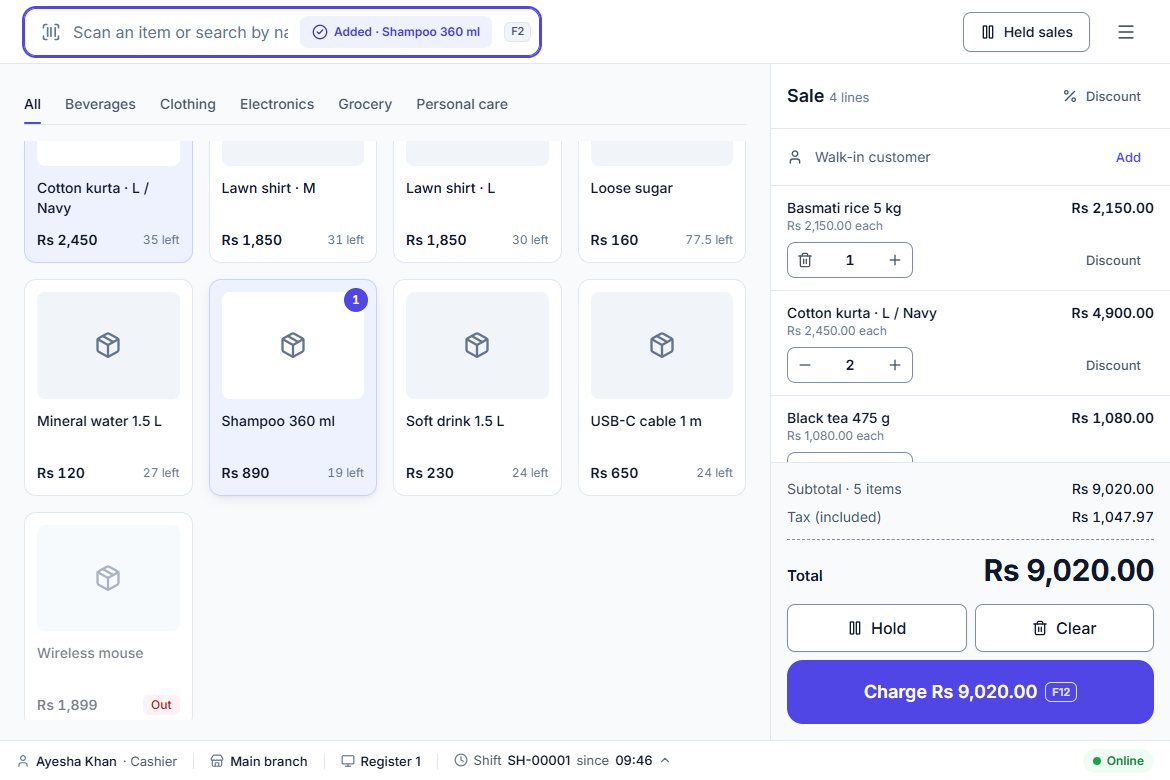
Highlights
- Multi-business (SaaS-ready): many businesses share one installation, each walled off from the others, with self-service sign-up, a free trial and plan limits.
- Multi-branch: stock per branch, transfers between branches, users limited to their own branches.
- Safe checkout: every sale is saved in one database transaction, and a retried sale is recognised by its idempotency key so it is never charged twice.
- Stock ledger: every stock change is an entry with the balance after it; weighted-average cost per branch.
- Cash control: shifts with opening float, paid in/out, safe drops and a denomination count at close; differences need a reason and a manager review.
- Security: one server-side policy per permission, no privilege escalation, an audit log that cannot be edited or deleted.
- Quality: 104 backend integration tests against a real SQL Server, frontend unit tests, GitHub Actions CI and Docker images.
2. What's in the package
| Folder | Contents |
|---|---|
documentation/ | This guide. |
source/ | The complete source code: backend/ (ASP.NET Core API, solution Pos.slnx, tests), frontend/ (Angular app), design-system/ (tokens, components, icons), docs/ (operations runbook, pilot checklist, testing guide), ops/ (backup, restore and load-test scripts), docker-compose.yml, .env.example and .github/workflows/ci.yml. |
binaries/api/ | The API, compiled (framework-dependent, .NET 10). Run with dotnet Pos.Api.dll. |
binaries/web/ | The web app, built for production. Static files for any web server. |
binaries/web-nginx.conf | An nginx site config that serves the web app and forwards /api to the API. |
3. Requirements
| To… | You need |
|---|---|
| Run with Docker (recommended) | Docker Desktop (Windows/macOS) or Docker Engine with Compose (Linux). At least 2 GB of free RAM for SQL Server; 4 GB recommended. |
| Develop or build from source | .NET 10 SDK, Node.js 24 and SQL Server 2019 or later (LocalDB, Express, Developer or full; Express is free for production). |
| Use the app | A current version of Chrome, Edge, Firefox or Safari. Any USB barcode scanner that types like a keyboard; any receipt printer the computer can print to. |
4. Quick start with Docker
This runs the whole system — SQL Server, the API and the web app — with one command.
- Unzip the package and open a terminal in the
sourcefolder. - Create your settings file from the example:
On Windows PowerShell usecp .env.example .envCopy-Item .env.example .env. - Open
.envin a text editor and fill in two values:DB_PASSWORD— a password for SQL Server: at least 8 characters with upper case, lower case, a digit and a symbol, e.g.Pos-Db-Pass-2026!JWT_SIGNING_KEY— 64 random characters. Generate one withopenssl rand -base64 48, or in PowerShell:$b = New-Object byte[] 48; [Security.Cryptography.RandomNumberGenerator]::Create().GetBytes($b); [Convert]::ToBase64String($b)
- Start everything:
The first build downloads SQL Server and the .NET and Node images, which takes a few minutes.docker compose up -d --build - Open http://localhost:8080, choose Create your business, fill in the form, and you are signed in as the owner.
docker compose logs -f api shows the API log. docker compose down stops everything; your data stays in the db-data volume.5. Run it for development
- Install the .NET 10 SDK, Node.js 24 and SQL Server LocalDB (it comes with Visual Studio, or install SQL Server Express).
- Start the API from the
sourcefolder:
It listens ondotnet run --project backend/src/Pos.Api --launch-profile httphttp://localhost:5080. In Development it creates thePosDbdatabase, applies migrations and seeds a demo business ("Demo Retail", two branches, an owner and a cashier). - In a second terminal, start the web app:
npm install --prefix frontend npm start --prefix frontend - Open http://localhost:4200 and sign in with a demo account from
backend/src/Pos.Api/appsettings.Development.json:Role Email Password Owner owner@demo.testOwner-Pass-2026Cashier cashier@demo.testCashier-Pass-2026
Swagger UI for the API is at http://localhost:5080/swagger in Development. backend/src/Pos.Api/Pos.Api.http has ready-made requests for Visual Studio or VS Code.
To use a different SQL Server, change ConnectionStrings:Default in backend/src/Pos.Api/appsettings.json (or set the environment variable ConnectionStrings__Default).
To change the database schema: dotnet ef migrations add <Name> --project backend/src/Pos.Api --output-dir Infrastructure/Migrations -- --environment Development
6. Use the pre-built binaries
If you don't want to build anything, binaries/ contains ready-to-run output.
API
Install the ASP.NET Core 10 Runtime, then from binaries/api:
# Linux / macOS
export ConnectionStrings__Default="Server=YOUR_SQL;Database=PosDb;User Id=sa;Password=...;TrustServerCertificate=True"
export Jwt__SigningKey="64-random-characters"
export Database__MigrateOnStartup=true
export ASPNETCORE_URLS=http://localhost:8081
dotnet Pos.Api.dll
# Windows PowerShell
$env:ConnectionStrings__Default = "Server=localhost\SQLEXPRESS;Database=PosDb;Trusted_Connection=True;TrustServerCertificate=True"
$env:Jwt__SigningKey = "64-random-characters"
$env:Database__MigrateOnStartup = "true"
$env:ASPNETCORE_URLS = "http://localhost:8081"
dotnet Pos.Api.dllWeb app
Serve binaries/web with any web server and forward /api and /health to the API, so the browser sees a single origin (the sign-in cookie depends on it). binaries/web-nginx.conf does this for nginx — change proxy_pass http://api:8080 to your API's address. Unknown paths must fall back to index.html.
On IIS: host the API with the ASP.NET Core Hosting Bundle, host binaries/web as a site with URL Rewrite (fallback to index.html) and Application Request Routing for /api.
7. Configuration reference
Settings live in appsettings.json. Each can be overridden by an environment variable: replace : with a double underscore, e.g. Jwt:SigningKey becomes Jwt__SigningKey. In Docker, set them in .env / docker-compose.yml.
| Setting | Default | What it does |
|---|---|---|
ConnectionStrings:Default | LocalDB | SQL Server connection string. |
Jwt:SigningKey | — (required) | Secret used to sign sign-in tokens. 48+ random characters in production. Changing it signs everyone out. |
Jwt:AccessTokenMinutes / Jwt:RefreshTokenDays | 15 / 14 | How long a token lasts, and how long a browser stays signed in without activity. |
Database:MigrateOnStartup | false (true in Docker) | Apply database migrations when the API starts. |
Signup:Enabled | true | Let anyone create a business from the sign-in page. Set false for a single-business installation. |
Signup:TrialDays | 14 | Length of the free trial for a new business (1–90). |
Billing:WebhookSecret | empty | Shared secret for the payment webhook. Empty disables the webhook (see Plans and payments). |
Https:Enforce | true | Outside Development: send HSTS and redirect HTTP to HTTPS. Set false only for a local trial over http. |
ReverseProxy:Enabled / ReverseProxy:ForwardLimit | false / 1 | Trust X-Forwarded-For/X-Forwarded-Proto from a proxy in front of the API (on in Docker). |
RateLimits:AuthPerMinute / RateLimits:RequestsPerMinute | 10 / 600 | Sign-in attempts per address, and requests per user, per minute. |
Seed:Enabled and Seed:* | false (true in Development) | Create a demo business with known passwords on an empty database. Refused in Production unless Seed:AllowInProduction is also set. |
Demo:ResetKey | empty | Public-demo mode only: enables a nightly reset endpoint and password-free demo sign-in. Never set it on a real installation; the API refuses it in Production unless Seed:AllowInProduction is set. |
8. Going to production
- HTTPS: put a TLS-terminating proxy in front of port 8080 (Caddy, Traefik, nginx with a certificate, a cloud load balancer or Cloudflare), then set
HTTPS_ENFORCE=truein.env. Never run a real shop over plain HTTP. - Backups:
docker compose exec db bash < ops/backup/backup.shwrites a verified, compressed backup toops/backup/out/and keeps 14 days. Run it nightly from cron and copy the files off the server. On Windows useops/backup/backup.ps1from Task Scheduler. Test a restore every month withops/backup/restore.sh. - Health checks:
/health(process up) and/health/ready(database reachable). - Updating: back up, replace the source with the new version, then
docker compose up -d --build. Migrations run on start. - Secrets: keep
.envreadable only by the account that runs Docker, and never commit it.
The full runbook is in source/docs/operations.md; source/docs/pilot-checklist.md lists what to check before the first real shop.
9. First steps in the app
- Business settings (Settings → Business): name, currency, time zone, whether prices include tax, the discount limit cashiers can give without approval, and whether selling needs an open shift.
- Branches and registers (Settings → Branches and registers): add each shop and each till in it.
- Taxes (Settings → Taxes): your tax rates; choose a default.
- Users (Settings → Users): add staff, give each a role and the branches they work in.
- Products: add them one by one (with sizes/colours as variants and barcodes), or import a CSV — download the template from Products → Import.
- Opening stock (Inventory → Import opening stock, or Adjust stock).
- Sell: open the POS, choose the register for this device, open a shift with the cash in the drawer, and start ringing up sales.
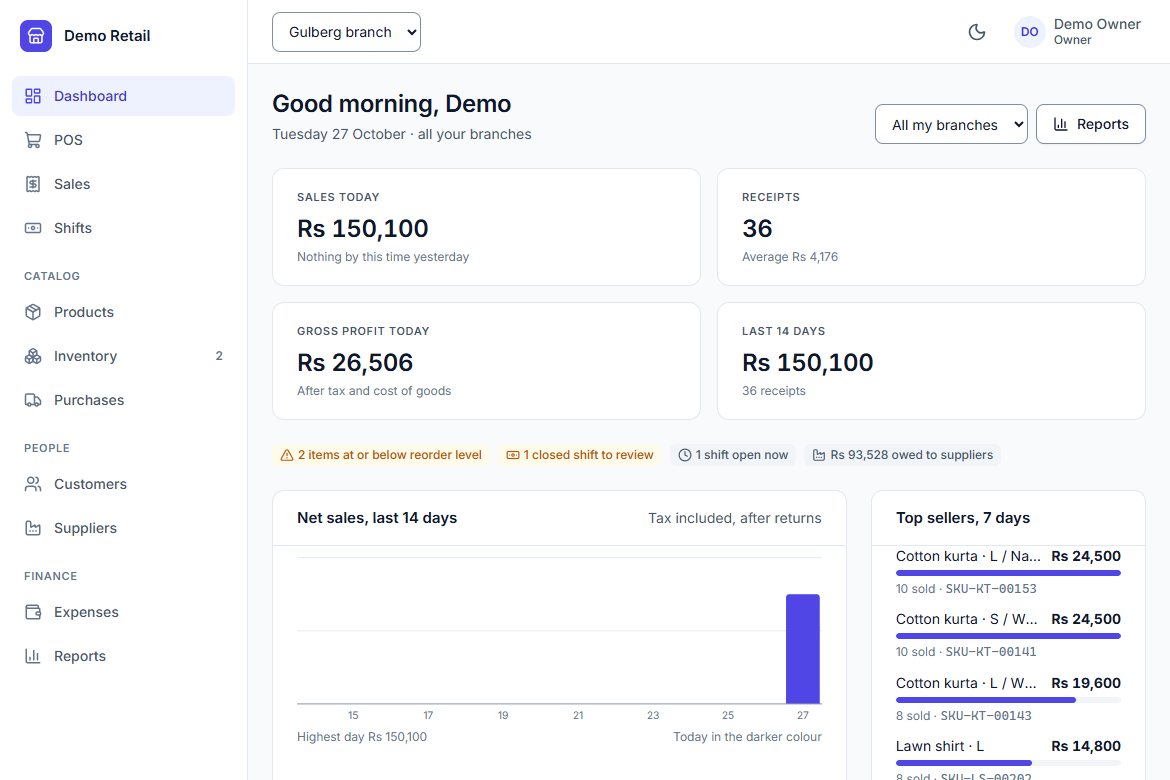
10. Features
| Area | What it does |
|---|---|
| Point of sale | Barcode scanning, search and product tiles; held sales; line and order discounts with manager approval above a limit; cash, card, bank transfer, wallet and split payments; change calculation; customers on the sale; printed receipts. |
| Registers and shifts | Opening float, paid in, paid out, safe drops; denomination count at close; expected vs counted cash; manager review of differences. |
| Sales | History with filters, receipts, partial returns and refunds to the original method, voids with reason and permission. |
| Products | Up to three options per product (e.g. size, colour, fit), each variant with its own SKU, barcodes, price and cost; categories, brands, units, tax rates; CSV import; price history; barcode label printing (38×25 mm and 50×30 mm thermal, A4 sheets). |
| Inventory | Stock ledger per branch, weighted-average cost, adjustments with reasons and approval above a value, stock counts that account for sales during the count, reorder list, opening-stock import, transfers between branches. |
| Purchasing | Suppliers with statements and payments, purchase orders, goods received against orders. |
| Finance and reports | Expenses (optionally paid from a till), dashboard, sales/profit/stock/purchases/cash reports with CSV export. |
| Administration | Users, custom roles, branches and registers, audit log, plans and billing. |
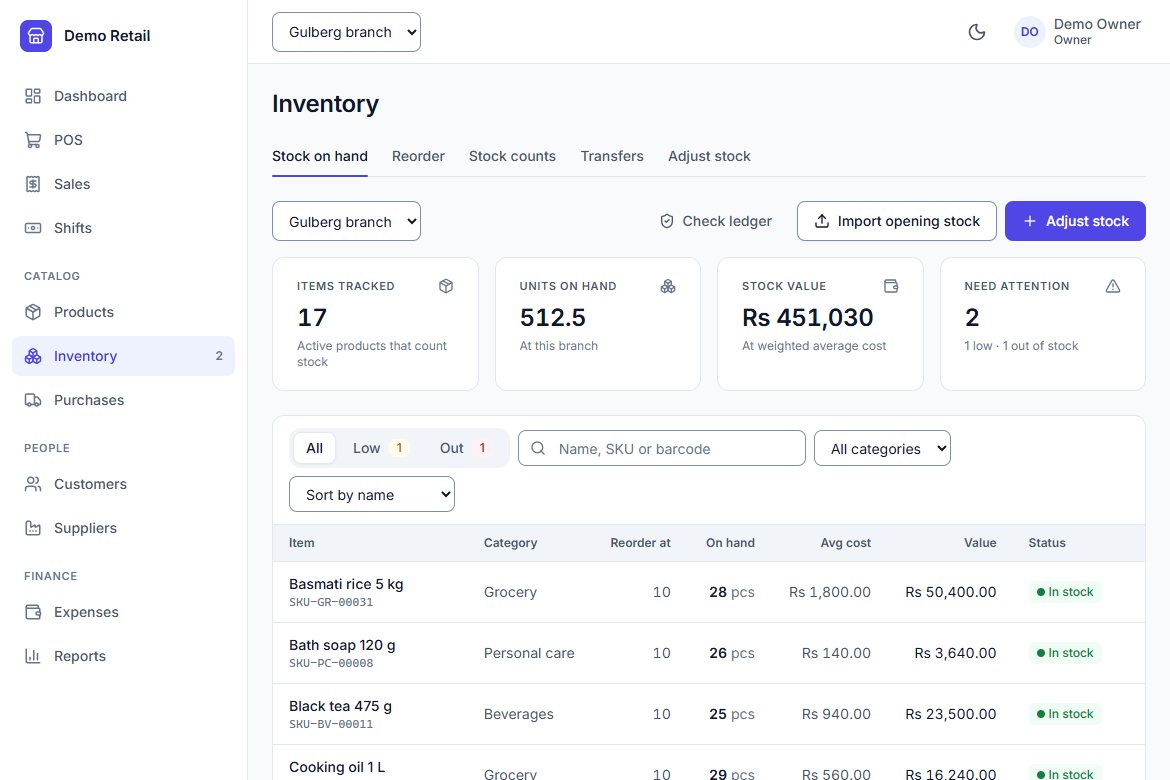
Not included: selling while offline, and integration with card terminals (the POS records card payments taken on a separate terminal). No country-specific tax filing integrations are included.
11. Roles and permissions
Every permission is enforced by the API; hiding a button is never the only protection. Built-in roles:
| Role | Can |
|---|---|
| Owner | Everything, including managing other owners. |
| Administrator | Everything except managing owners. |
| Manager | Run a branch: sell, approve discounts, refunds and voids, manage products, stock, purchases, customers, suppliers, expenses, review shifts, view reports. |
| Cashier | Sell, run their own shift, view sales, products and stock, add customers. |
| Inventory staff | Manage products, stock and purchases; view suppliers. |
| Accountant | View sales, purchases, suppliers, customers and reports; manage expenses; review shifts; read the audit log. |
You can create your own roles in Settings → Roles. Someone who manages users can only grant permissions they hold themselves.
12. Customising
| To change… | Edit |
|---|---|
| Colours, radius, fonts | frontend/src/styles/tokens.css (light and dark themes). See design-system/README.md. |
| App name shown on sign-in and in the sidebar | Search the frontend for Point of Sale: frontend/src/index.html, features/auth/*.page.ts, layout/shell.component.ts, page titles in app.routes.ts. |
| Plans, prices and limits | backend/src/Pos.Api/Modules/Billing/Billing.cs → Plans.All. |
| Currencies offered at sign-up | backend/src/Pos.Api/Modules/Tenancy/Signup.cs → Currencies. |
| Demo products | backend/src/Pos.Api/Modules/Catalog/CatalogSeed.cs. |
| Receipt layout | frontend/src/app/features/sales/receipt.ts. |
After changing the frontend, rebuild with npm run build --prefix frontend (or docker compose up -d --build).
13. Plans and payments
Each business is on a plan (Starter, Growth, Business by default) that limits branches, registers and users; the API enforces the limits. A new business starts on a free trial. When a trial ends or a payment lapses, the business becomes read-only — staff can still view and export everything, but can't sell or change data — until a plan is active again.
No payment provider is connected out of the box. To connect one (Stripe, Paddle, a local gateway):
- Implement
IBillingProvider(inModules/Billing/Billing.cs) to return a checkout URL for a plan, and register it inProgram.csinstead ofNoBillingProvider. - Translate your provider's webhook into the POS's own event shape and send it to
POST /api/v1/billing/webhook, signed with the headerPos-Signature: t=<unix seconds>,v1=<hex HMAC-SHA256 of "t.body">usingBilling:WebhookSecret. Events are idempotent by id.
{ "id": "evt_123", "type": "subscription.updated",
  "data": { "tenantId": "…", "plan": "growth", "status": "Active", "currentPeriodEnd": "2026-12-01T00:00:00Z" } }
Without a provider, change a business's plan directly in the database (tenancy.Tenants.PlanKey, SubscriptionStatus, CurrentPeriodEndsAt).
14. Architecture and code
- Backend (
backend/src/Pos.Api): ASP.NET Core minimal APIs organised as a modular monolith —Modules/Identity,Tenancy,Audit,Catalog,Sales,Inventory,Registers,Customers,Purchasing,Expenses,Reports,Billing. Entity Framework Core with migrations inInfrastructure/Migrations. - Multi-tenancy: every tenant-owned table has a global query filter; a request without a signed-in business reads nothing.
- Authentication: short-lived JWT access tokens in memory, rotating refresh tokens in an HttpOnly, SameSite=Strict cookie, lockout after 5 failed attempts.
- Money is
decimal(19,4); times are stored in UTC and shown in the branch's time zone. - Frontend (
frontend/): Angular standalone components and signals, Tailwind CSS v4 and thepos-*component classes from the design system, lazy-loaded feature routes.
15. Tests and CI
dotnet test backend
npm test --prefix frontend -- --watch=false
Backend tests recreate a separate PosDb_Tests database on each run (set POS_TEST_CONNECTION for another SQL Server). .github/workflows/ci.yml runs both suites on every push, checks every model change has a migration, and builds the Docker images.
16. Troubleshooting
The db container keeps restarting
DB_PASSWORD doesn't meet SQL Server's rules (8+ characters with upper, lower, digit and symbol), or the machine has less than 2 GB free memory. Check docker compose logs db.
"Unsafe production settings" when the API starts
The message lists what to fix: usually a short JWT_SIGNING_KEY or demo seeding left on.
Port 8080 is already in use
Set WEB_PORT=8090 (or any free port) in .env and run docker compose up -d again.
Signed out after every page reload
The web app and the API must be on the same origin (the web server forwards /api), and over HTTPS the API must know it is behind HTTPS (ReverseProxy:Enabled=true with your proxy sending X-Forwarded-Proto).
"Plan needed" when selling
The business's trial or plan has ended and it is read-only. See Plans and payments.
17. Support
Email daydreamatelier8@gmail.com with your order number, the version, how you run it (Docker or manual), the steps to reproduce and any error from docker compose logs api. Support is included for 6 months from purchase and covers installation questions, bugs and help using the included features; customisation work is not included but can be quoted separately. Updates to version 1.x are free for 12 months.
Your licence terms (Regular or Extended) are in LICENSE.txt at the top of the download.
18. Changelog
1.0.0
- Initial release.
19. Credits and licences
Tilly POS uses the following open-source software. All allow commercial use and redistribution.
| Component | Licence |
|---|---|
| .NET, ASP.NET Core, Entity Framework Core, Microsoft.Data.SqlClient | MIT |
| Swashbuckle.AspNetCore.SwaggerUI | MIT |
| xUnit (tests) | Apache-2.0 |
| coverlet (tests) | MIT |
| Angular | MIT |
| RxJS | Apache-2.0 |
| Tailwind CSS, PostCSS | MIT |
Lucide icons (@lucide/angular) | ISC |
| tslib | 0BSD |
| TypeScript | Apache-2.0 |
| Vitest, jsdom, Prettier (development) | MIT |
| Inter typeface (loaded from Google Fonts) | SIL Open Font License 1.1 |
SQL Server is Microsoft software under its own licence; the Docker setup uses the free Express edition (MSSQL_PID: Express) and accepts its EULA. Product names in the demo data are fictional.