A till that cannot lose a sale.
Checkout, cash drawer, returns, stock in every branch, buying from suppliers and the reports an owner actually opens — in one system that runs in a browser. Ready now, priced in the open, and open to click through before you speak to anyone.
No sign-up and nothing to type: both demo buttons open a shop with two branches and a day of trading already in it. Run a clothing or shoe shop? See how it handles sizes and colours.
Sound familiar?
Four sentences that come up with almost every shop owner.
“We count the drawer every night, and it never quite adds up.”
The drawer is short and nobody can say whether it was a wrong change, a refund that was never written down, or cash taken out for the delivery boy.
“The register says ten. The shelf has six.”
Stock is a number somebody overwrote. Nobody can show where the other four went, so reordering is a guess made after the item has already run out.
“The cashier gave a discount — who said they could?”
Discounts, voids and refunds happen at the counter and are discovered at month end, if at all.
“The other branch sends its numbers on WhatsApp.”
Each branch is its own island. The owner sees a photo of a notebook, not the day’s sales, margin and stock in one place.
Everything a shop runs on, already built
This is not a proposal. Every card below is a screen in the demo, working today.
Checkout
Barcode scanner, search or tap. Held sales, line and bill discounts (above a limit a manager approves on the spot), cash, card, bank transfer, JazzCash/Easypaisa and split payments, a customer on the bill, a printed receipt.
Cash drawer & shifts
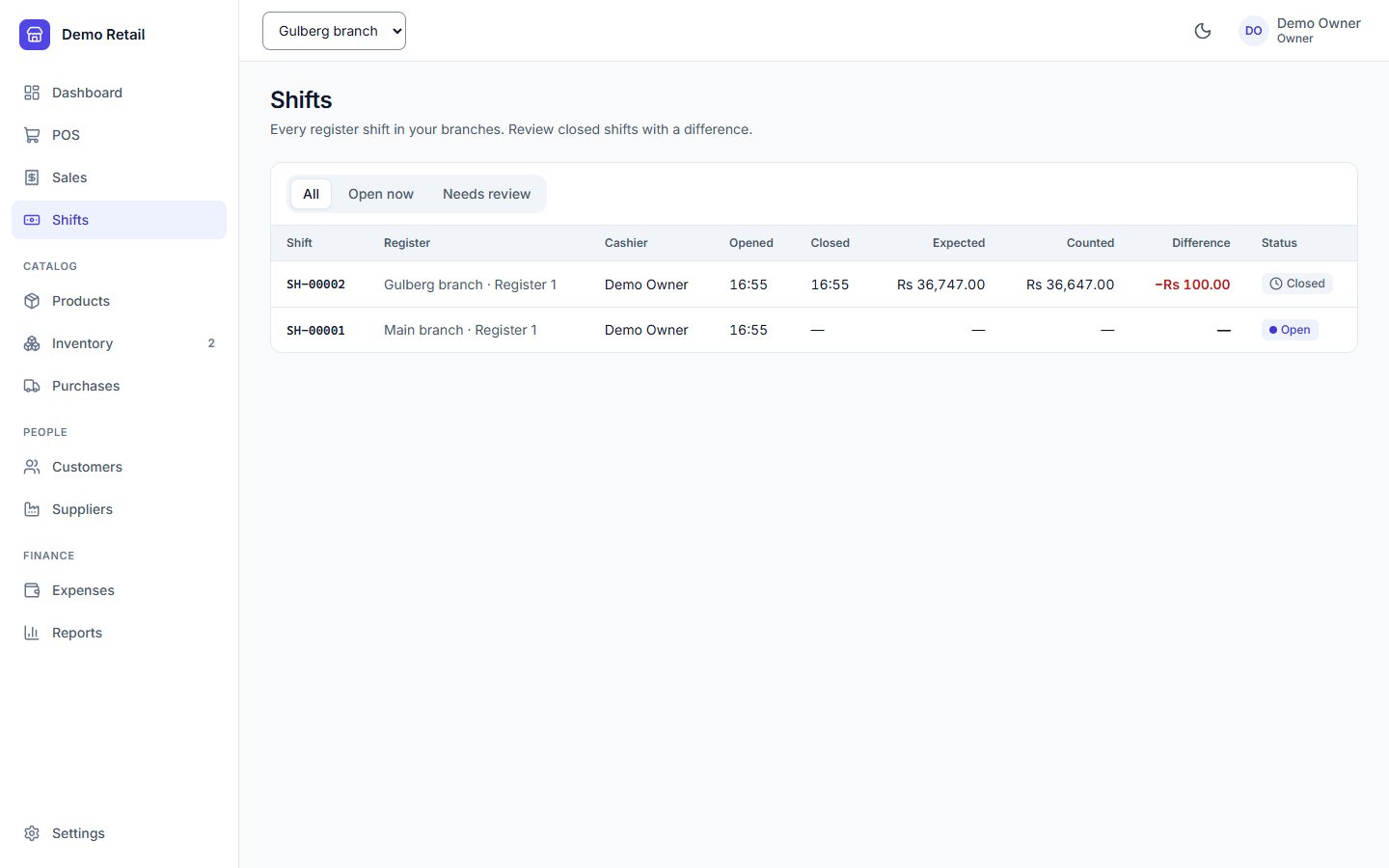
Opening float, paid in, paid out, safe drops, and a note-by-note count at closing. The system knows what should be in the drawer; a difference needs a reason and a manager’s review.
Returns & voids
Return part of a bill, refund to the way it was paid, put the item back on the shelf or write it off. Voids need a reason and the right permission.
Products
Sizes and colours as variants, barcodes, categories, brands, units, tax rates. Import a spreadsheet, print barcode labels, and every price change is kept.
Stock in every branch
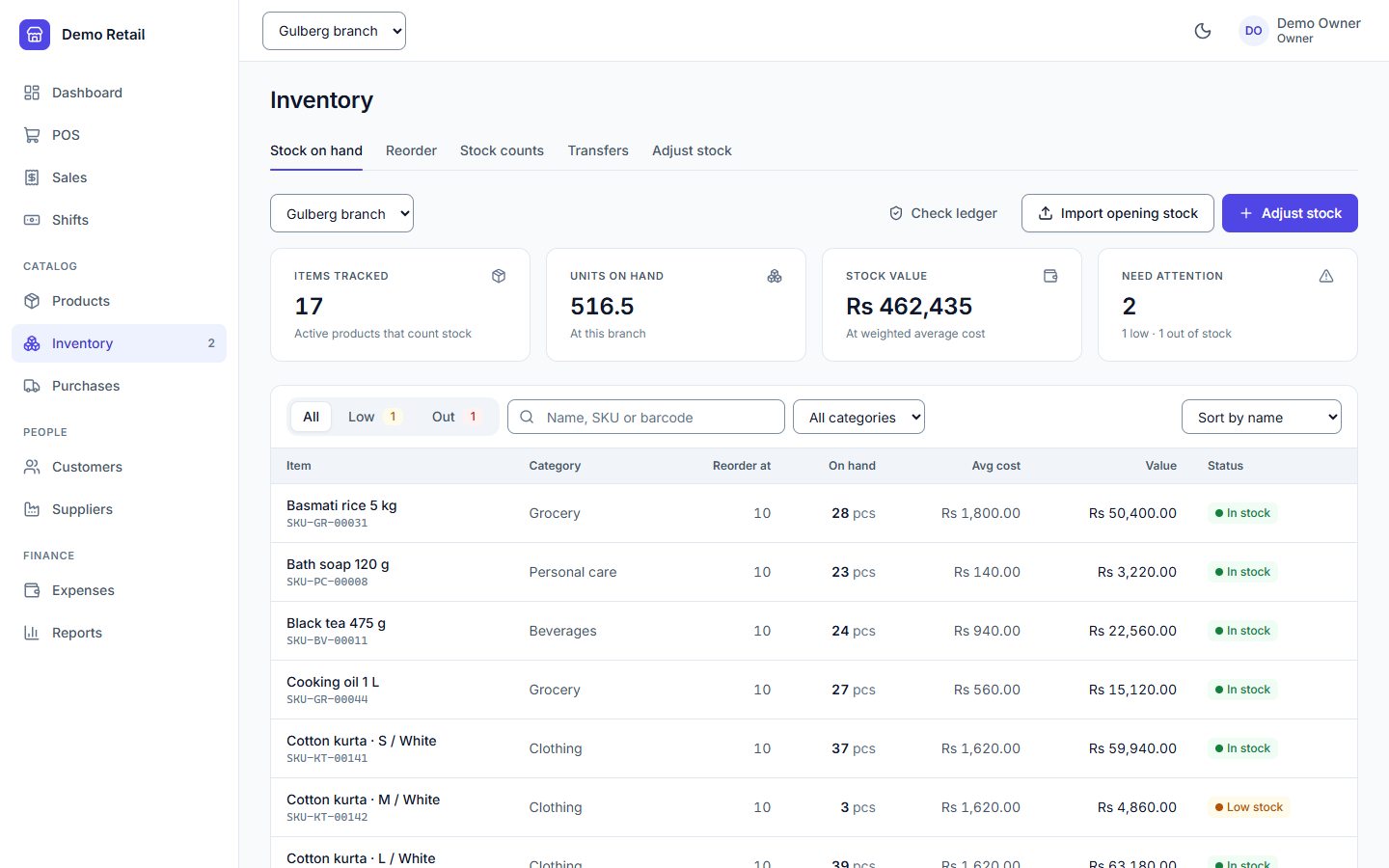
On hand per branch, average cost, reorder list, stock counts that ignore sales made while counting, adjustments with a reason, and transfers between branches.
Buying
Suppliers with a running statement, purchase orders, goods received against the order, and payments to suppliers. What you owe is always one click away.
Money & reports
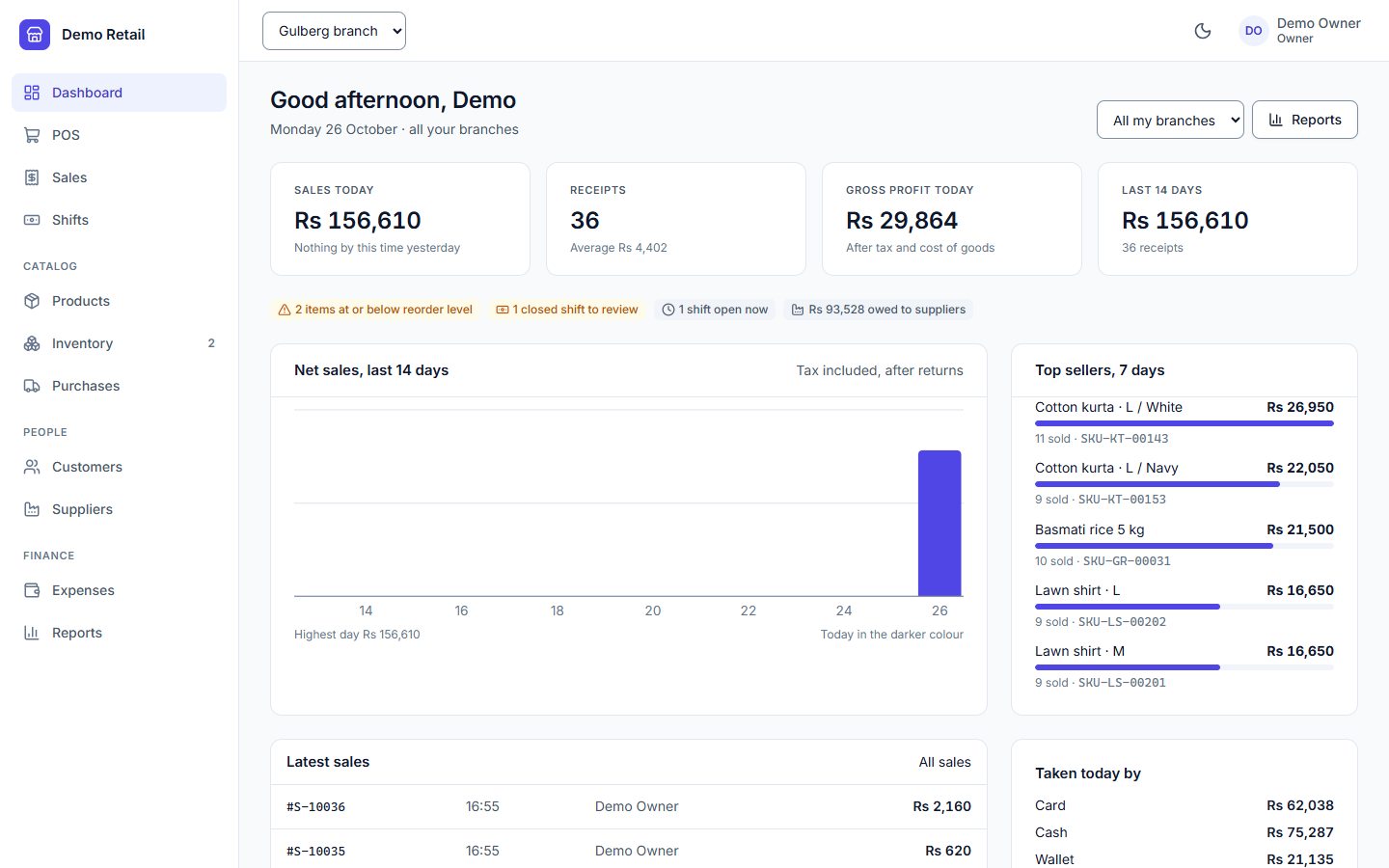
Today’s sales and profit on the dashboard. Sales, profit, stock, purchases and cash reports, expenses (paid from the till if you like), and every report exports to a CSV that opens in Excel.
Staff & roles
Owner, manager, cashier — or roles of your own. A cashier sees the till, not the purchase prices. Each person can be limited to their own branch.
Audit log
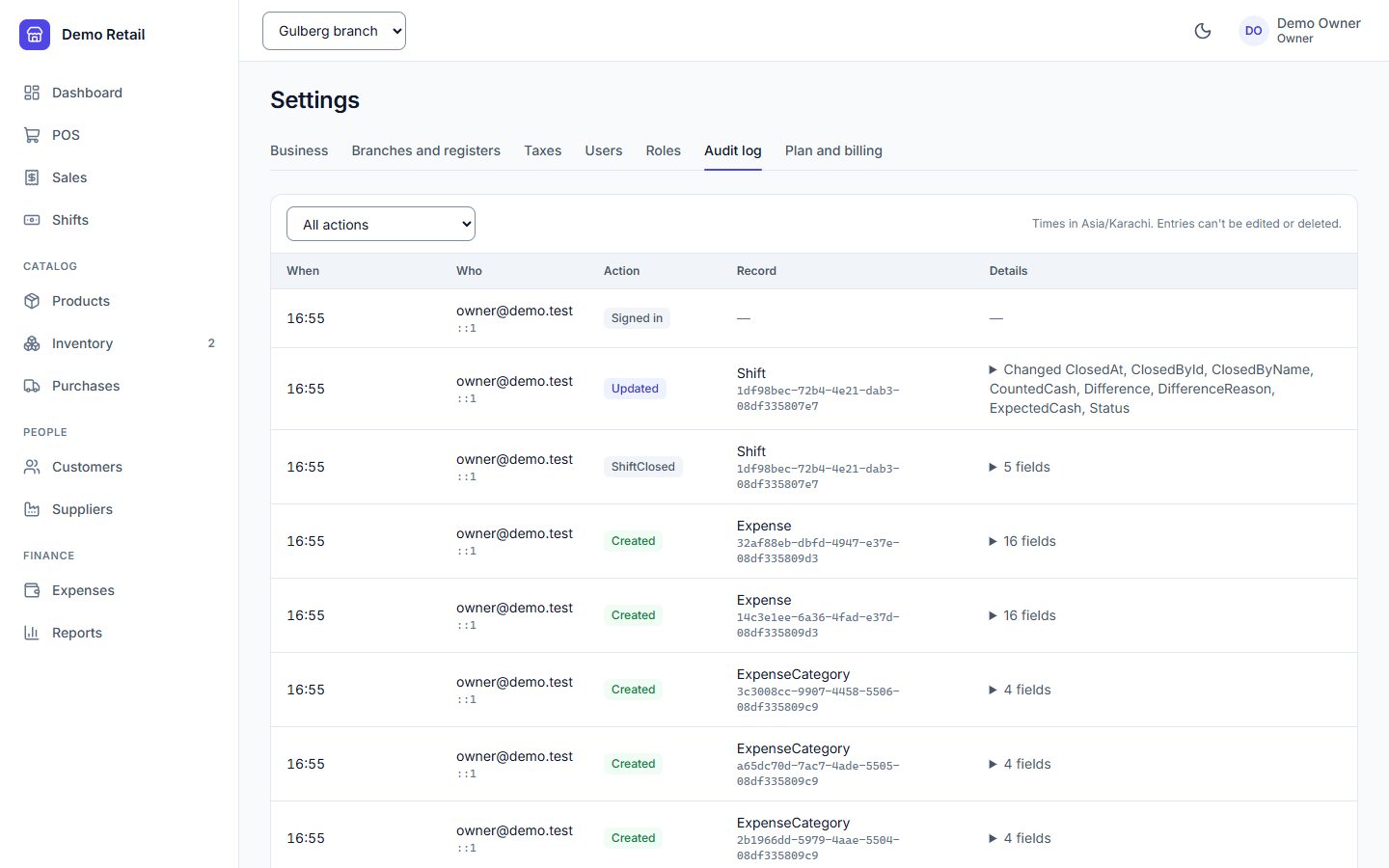
Every sale, discount approval, price change, stock adjustment and shift close is recorded against a name and a time — and the log itself cannot be edited or deleted.
What the owner opens
Taken from the demo after a normal trading day: two branches, thirty-six sales, one return, one delivery from a supplier.
The parts you never see, and why they matter
A POS is judged on its worst day, not its demo. These are enforced by the server, so a bug in a screen — or a clever employee — cannot get round them.
Pressing Charge twice charges once
Every checkout carries a one-time key. If the network drops and the cashier presses again, the second press gets the first sale back instead of making a new one.
A sale is saved whole or not at all
The bill, its payments, the stock it takes and the audit entry are written together. There is no such thing as a sale that charged the customer but forgot to reduce stock.
Two tills cannot sell the last one
If two cashiers ring up the final unit at the same moment, one succeeds and the other is told only zero is left — unless you have chosen to allow selling below zero.
Stock is a ledger, not a number
Every sale, return, delivery, count and transfer is a movement with what was left afterwards. When the shelf disagrees, you can see exactly where it went.
Nobody hands out more than they have
A manager who can add staff cannot create a role with powers they do not hold themselves — otherwise they could make an account and sign in as it.
Products are never deleted
They are archived, so last year’s bills still show what was sold and at what price. Two people editing one product cannot silently overwrite each other.
Money is counted in rupees and paisa, exactly
No rounding drift from floating-point arithmetic: a day of a thousand bills adds up to the paisa.
Ring up a sale yourself
The demo is a fictional shop with two branches in Lahore and a day of trading already in it. Sell something, return it, close the till short and see what the owner sees. It resets every night, so nothing you do can break it.
Cashier cashier@demo.test · Demo-Cashier-2026
The demo runs on a free cloud tier. If it has been idle it can take up to a minute to wake on the first click; after that it is quick.
Pay monthly, or own it outright
Every plan has every feature. The plans differ only in how many branches, tills and staff accounts you run — and the system enforces those limits itself.
Starter
One shop.
- 1 branch
- Up to 2 tills
- Up to 5 staff accounts
- Every feature on this page
Growth Most shops
A shop with a second or third branch.
- Up to 3 branches
- Up to 10 tills
- Up to 25 staff accounts
- Transfers and one combined view across branches
Business
A chain.
- Unlimited branches
- Unlimited tills
- Unlimited staff accounts
- Every feature on this page
Every monthly plan includes the hosting, daily backups and updates — there is nothing to install. If a payment is missed the system does not lock you out. It becomes read-only: you can still open every bill and report and export all of it. Selling resumes the moment the plan is active again.
Own it
For owners who would rather not pay a monthly bill.
- Installed on your computer or server — your data never leaves the shop
- Your products and opening stock imported for you
- No limit on branches, tills or staff
- Then PKR 30,000 a year for support and updates
Which should I choose?
Monthly if you want to start this week and never think about servers or backups. The licence if you have more than one branch and plan to run it for years — against the Growth plan it has paid for itself before the end of the third year.
How do I pay?
Bank transfer, JazzCash or Easypaisa. You get an invoice for every payment.
Do I need new hardware?
No. It runs in the browser on the computer you already have. Any USB barcode scanner works, and receipts print to an ordinary receipt printer.
What it does not do yet, so nobody finds out after paying: it cannot keep selling while the internet is down (planned as its own release), and it does not talk to card machines — the cashier takes the card on your bank’s terminal and the POS records it. It also does not file anything with FBR.
Buy the source code
Run it yourself, build on it, or launch your own POS service. You get the full ASP.NET Core 10 and Angular source, compiled binaries, a one-command Docker setup, 104 integration tests and step-by-step documentation.
Regular licence
For one business: your own, or one client’s.
- Full source code and binaries
- Every branch, register and user of that business
- Modify it and charge that client for your work
- 6 months of email support, 12 months of updates
Extended licence
To run it as your own paid POS service.
- Everything in Regular
- Offer it as SaaS under one brand
- Any number of businesses sign up and pay you
- 6 months of email support, 12 months of updates
Instant download after payment. Checkout, tax and receipts are
handled by Gumroad. Licence terms are in LICENSE.txt inside the download; neither
licence allows reselling or sharing the source code itself. Try the
live demo first.
Start the trial, or ask first
Tell me the shop, the number of branches and tills, and roughly how many products you carry. I set up your business, import your products, and you are selling the same week.
Or send the details here
Goes straight to my inbox.
Built end to end by Zohaib Ahmad, Senior .NET Developer, Islamabad — ASP.NET Core on .NET 10, Angular and SQL Server. How it is engineered is written up on the main page.